How It Works
Downshiftr is a habit app organized around one observation: habits are not all the same kind of thing. Some cost activation energy to start. Some settle your nervous system back down. Treating them identically is why “just be consistent” fails — consistency at the wrong moment is how people burn out.
The Habit Map
Everything lives on one screen: your goals, and the habits that serve them. “Apply to two jobs” sits inside Land the next job. “Walk around the block” sits inside Stay regulated. Goals can nest — Stay regulated can itself live inside Get strong again.
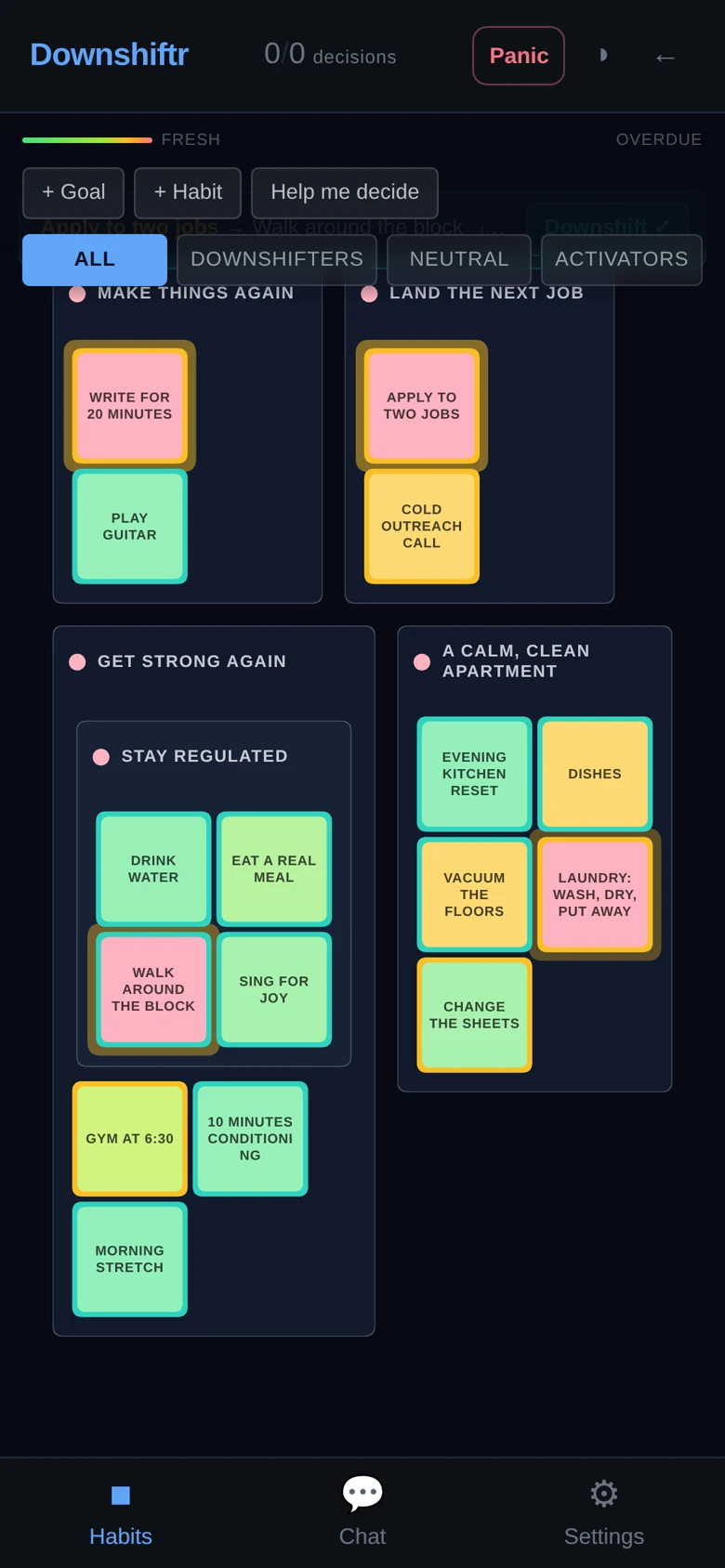
Every habit has an interval — every 4 hours for drinking water, daily for dishes, weekly for laundry. Each card’s color shows how much of that interval has passed since you last did it:
- Green for most of the interval. A habit you did this morning doesn’t turn yellow by lunch. Fresh is fresh.
- It warms up — lime, yellow, orange — only as it genuinely comes due.
- Red means overdue. Nothing else happens. There are no streaks to lose and no guilt screens. The color simply tells the truth.
Goals take the color of their most-neglected habit, so a whole area of life going stale is visible immediately.
Tapping a habit logs it done right there — the square turns green in place, so you can tap through a whole run of habits without leaving the map. Press and hold a habit to open its card instead: log it backdated (“actually I did that last night”), edit it, or start an activation session.
Activators and Downshifters
Every habit is classified as an activator, a downshifter, or neutral.
Activators are habits that cost activation energy to start: the gym session, the job applications, the cold call, the pile of laundry. Each carries an activation cost.
Downshifters are habits that settle you: a walk around the block, doing the dishes, eating a real meal, singing. They complete the stress cycle that activators open.
When you start an activator, you open an activation session: you pre-commit to the downshifter you’ll use to land afterward. Any habit can serve as the downshifter. Until you resolve the session, that activation cost stays on the books as activation debt — a number the app (and the coach) watches.
This is the core loop, and it’s why the app is called Downshiftr: sustained effort is fine, but only if you keep paying the debt down. Resolving a session logs the downshifter and closes the loop. Over time the app learns which downshifters actually settle you after which activators — your own regulation map, built from what you actually did.
The full reasoning is on the Activation Debt page.
The Coach
The chat tab is a coach with hands, not just opinions. It can act on your data directly from conversation:
- Log habits — “I did the dishes” logs the habit, backdating included.
- Create and edit habits and goals — “add a daily 10-minute stretch under Get strong.”
- Start and resolve activation sessions — “I’m starting the applications, queue the walk.”
- Set timers and reminders — “give me 25 minutes then check on me” creates a real one-off timer; “check in every 20 minutes” a recurring one.
- Snooze reminders — “pause the water check until 6pm,” and it resumes on its own.
- Manage your to-do list and answer against your real state: what’s overdue, how much activation debt is open, your latest State Check, and the local time where you are.
Conversations are saved in named sessions, and the coach’s grounding is the science published on this site — its instructions are built from these very pages. Its style is deliberate: engage, don’t guilt. It treats a red card as information, not a failure.
Reminders That Reach You
Downshiftr sends real push notifications from the browser — no app store and no third-party messenger. This runs on the open Web Push standard.
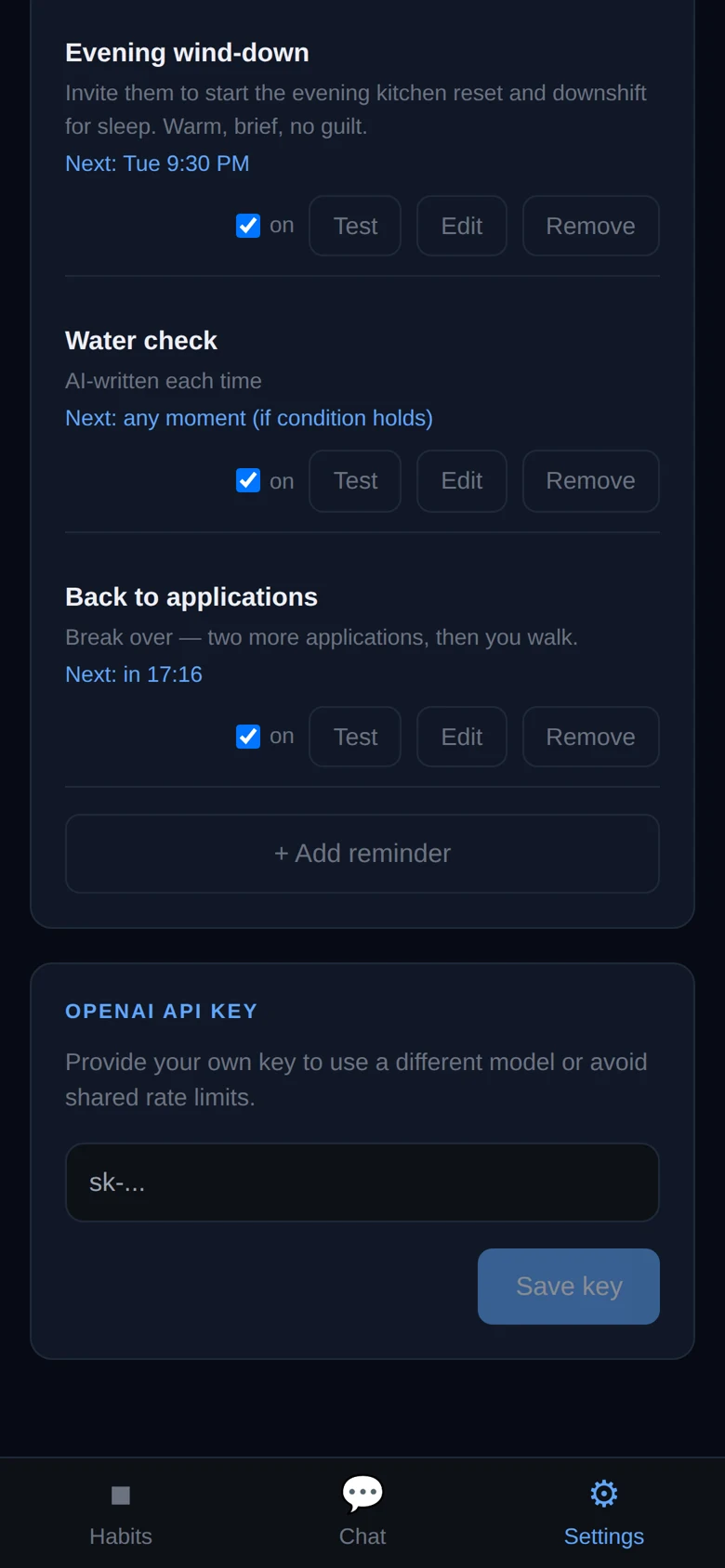
- Morning nudge. One message at the time you choose, written fresh by the coach each day, oriented around engagement rather than obligation.
- Rules. Daily at a time, weekly on chosen days, every N hours or minutes, or once at a moment. A rule can be conditional — fire only if a habit is overdue, activation debt is above a threshold, or no downshifter has happened recently.
- Timers. “Set a timer for 25 minutes” in chat becomes a one-off notification; settings shows the countdown ticking live.
- Snooze. Pause any rule until a time and it resumes by itself.
- Actions in the notification. Habit-scoped nudges carry a “log it” button. On Android you can reply to the coach from the notification shade and get an answer there — a whole check-in without opening the app.
One honest platform note: on iPhone, Safari only delivers push notifications to web apps added to the home screen. Add it once and you’re set.
The Panic Button
Always in the top bar. When your alarm system fires, the flow is body first, words second:
- Breathing gate. A press-and-hold breathing guide — inhale while pressing, exhale on release — timed to stimulate the vagus nerve and bring the thinking brain back online. Skippable if you’re past it.
- Describe. You type what’s happening; the guide responds.
- Name the body state. Four tiles — Flooded, Collapsed, Locked, Unreal — each mapping to a different physiological response, one recommended based on what you wrote.
- Recognition. Identify which alarm actually fired — separation, engulfment, evaluation, or chaos panic — and which goal it’s tied to.
- Stay in the cycle. The resolution isn’t escaping the feeling; it’s recognizing it and staying, which is how the cycle completes.
The model behind the four panic types is on the Panic Button page.
The State Check
A short questionnaire — physical activation, mood, approach, sense of control, bandwidth, and more — that snapshots your current state. Attach it to a chat and the coach calibrates: a depleted state gets a landing plan, a resourced state gets the hard thing.
The dimensional model it uses is documented under The 8 Dimensions and the named states.
What It Runs On
A web app, free, at downshiftr.com/app. Sign up with a username and password — an email is optional (with one, you can also sign in by magic link). It works in any modern browser on phone or desktop; add it to your home screen for the full experience, including notifications on iOS.